

Description
Click to Chat Button – Live Customer Messaging, Support & Conversions for WooCommerce
WhatsApp chat 💬 with a floating WhatsApp chat button 🟢, WhatsApp integration for WooCommerce 🔥, and fast, mobile-optimized customer support ⚡
This plugin is built for store owners and businesses that want a reliable WhatsApp chat button with a clean click to chat flow. Visitors can open chat quickly, ask pre-sales questions, and get support without friction.
Customer communication and SEO relevance
Clear customer communication often improves on-page engagement signals. When users can ask product, shipping, or payment questions instantly, they spend less time searching and more time completing actions.
For WooCommerce websites, this supports common intent paths:
- product inquiry before checkout,
- order status and delivery support,
- post-purchase customer support,
- mobile-first contact for fast responses.
Core benefits for WooCommerce and business sites
- WhatsApp click to chat: direct contact path from high-intent pages.
- Floating chat button: always-visible entry point for support.
- WooCommerce compatibility: useful across shop and product journeys.
- Support workflow fit: helps sales and service teams handle chat faster.
- Global business use: practical for multilingual and international stores.
Typical use scenarios
- online stores handling product and shipping questions,
- local services collecting leads from mobile visitors,
- campaign landing pages that need direct customer contact,
- brands that prefer chat-first customer support.
The plugin keeps assets small through optimized icons, so your site stays quick. Add a WhatsApp link for support and sales, or go deeper with WooCommerce triggers and page-aware messages.
Why choose Click to Chat?
Store owners use it to add a direct WhatsApp line to their team and reduce friction before checkout. It is built around WooCommerce pages and everyday support workflows.
- Improved conversion: a visible WhatsApp entry point can calm last-minute questions before purchase.
- WooCommerce-aware: show or hide on shop, cart, checkout, account, and product flows as you prefer.
- Performance-minded: compressed icons and lean front-end code.
- Smarter links: optional context from the current page for clearer WhatsApp conversations.
- Languages and RTL: Arabic, Turkish, German, Spanish, and 110+ other locales.
- Orders and questions: customers can message about products from product pages in one step.
- Quick setup: add your WhatsApp number, pick a style, and go live.
What you get
- Business hours and offline messaging so expectations stay clear when you are away.
- Six button styles to match your brand.
- Built-in analytics for clicks and engagement.
- Separate mobile and desktop offsets so the button stays out of the way of checkout and key controls.
Common uses
- E-commerce help on product and catalog pages.
- Order and shipping questions for international stores (including Turkish-speaking teams).
- Lead capture on landing pages.
- Ongoing client contact for offers and follow-ups.
Screenshots
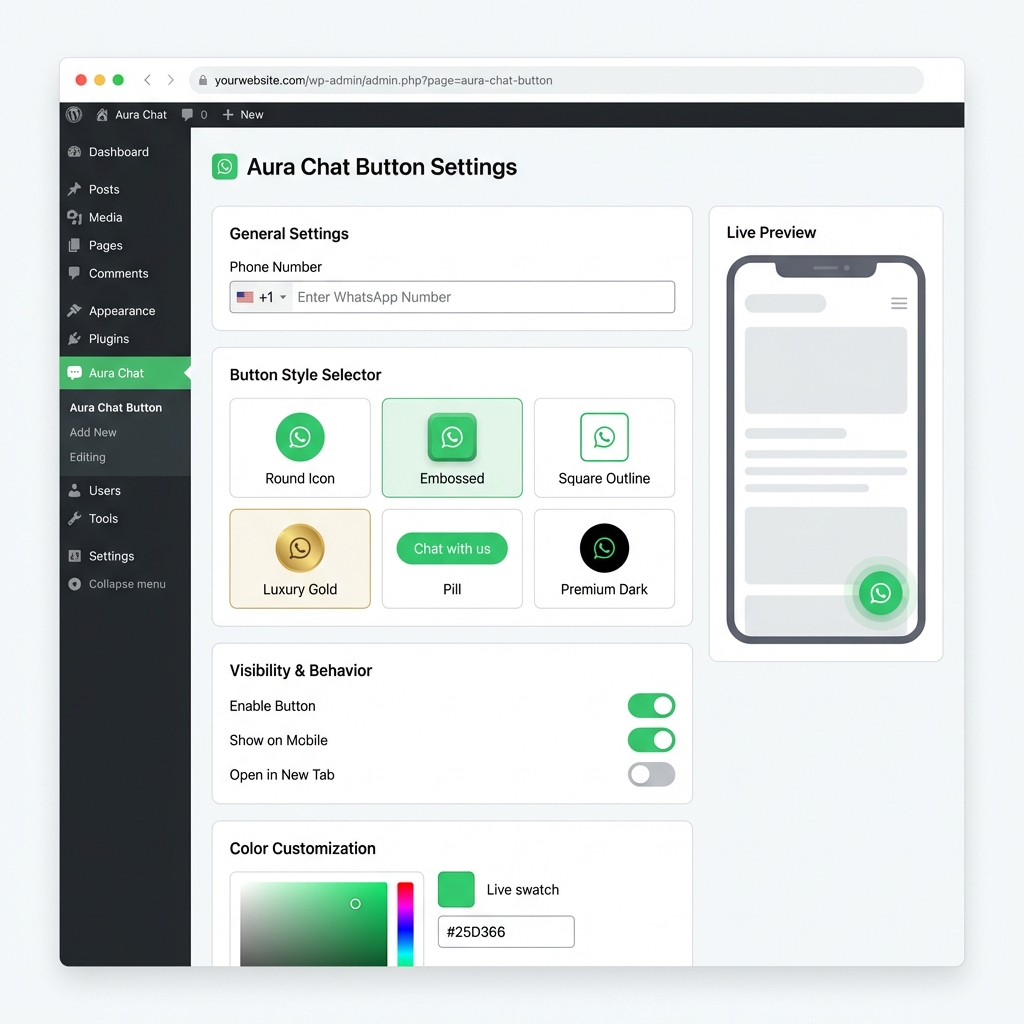
Dashboard overview—general options and messages. 
WooCommerce visibility and page rules. 
Analytics for clicks and trends.
Installation
- Upload the
aura-chat-buttonfolder to the/wp-content/plugins/directory. - Activate Aura Click to Chat from the Plugins screen.
- Open the plugin screen from the admin menu.
- Enter the phone number (with country code) and adjust the button and messages.
- Choose WooCommerce visibility and save.
FAQ
-
Is this compatible with WooCommerce?
-
Yes. It can follow WooCommerce screens and pass useful page context into the conversation.
-
Does image optimization help site speed?
-
Smaller icons load faster. That supports Core Web Vitals and a smoother mobile experience; it is not a guarantee of search rankings.
-
Can I use a business profile for messaging?
-
Yes. The link works with common personal and business setups on the major chat apps.
-
Do you support multiple languages?
-
Yes. The interface is translation-ready, including RTL languages and many locales.
-
Yes. You can set offsets so it does not cover checkout, cart, or other important controls.
-
Can I use more than one phone number?
-
You configure one number in the settings; you can change it anytime or point it to the right agent for your store.
-
Does it open the app on phones and web on desktop?
-
It aims to open the native app on phones and a compatible web experience on larger screens when available.
-
Yes. You can set margins for mobile and desktop independently.
-
Can customers ask about a specific product?
-
Yes. Links from product pages can include context so customers reference the right item.
Reviews


Contributors & Developers
“Click to Chat Button – Live Customer Messaging, Support & Conversions for WooCommerce” is open source software. The following people have contributed to this plugin.
Contributors
“Click to Chat Button – Live Customer Messaging, Support & Conversions for WooCommerce” has been translated into 6 locales. Thank you to the translators for their contributions.
Interested in development?
Browse the code, check out the SVN repository, or subscribe to the development log by RSS.
Changelog
1.1.13
- Improved: Under-the-hood maintenance for better stability.
- Updated: Compatibility checks and minor code cleanup.
1.1.12
- RELEASE: Maintenance version bump.
1.1.11
- RELEASE: Maintenance version bump.
1.1.10
- RELEASE: Maintenance version bump.
1.1.9
- RELEASE: Maintenance version bump.
1.1.8
- UPDATED: Full directory title in readme for search; short “Aura Click to Chat” in the main plugin header for the installed-plugins list (no
all_pluginsfilter).
1.1.7
- UPDATED: Full directory title restored; installed-plugins list shows the short label “Aura Click to Chat”.
1.1.6
- UPDATED: Plugin list name “Aura Click to Chat” and admin menu label “Aura Chat”.
- IMPROVED: Readme metadata (title, short description, tags) for WordPress.org guidelines.
- FIXED: Translation loading uses
Text DomainandDomain Pathheaders only; removed discouragedload_plugin_textdomainusage for Plugin Check compatibility.
1.1.5
- FIXED: Renamed plugin to comply with directory guidelines.
- FIXED: Cleaned up description and removed keyword stuffing.
- UPDATED: Verified compatibility with WordPress 6.9.
1.1.4
- NEW: TinyPNG-level optimization features and clarified admin interface.
- IMPROVED: Faster loading times for better PageSpeed scores.
- UPDATED: Enhanced compatibility with WooCommerce product page triggers.
1.1.3
- NEW: Optimized admin dashboard for a more user-friendly experience.
- IMPROVED: TinyPNG-level asset compression performance for faster loading.
- UPDATED: Verified compatibility with the latest WordPress engine and WooCommerce versions.
1.1.2
- UPDATED: Verified compatibility with WordPress 6.9.
- IMPROVED: Overall stability and performance enhancements.
1.1.1
- NEW: Optimized directory title for better visibility.
- FIXED: Removed growth and bounce animation from Style 5 for a cleaner UI.
- UPDATED: Refined structure for WooCommerce support keywords.
1.1.0
- NEW: Optimized metadata for better WooCommerce integration.
- NEW: Enhanced support descriptions.
- UPDATED: Refined metadata for better chat integration.
- UPDATED: Improved asset loading performance.
1.0.9
- NEW: TinyPNG logic for advanced asset compression and faster loading.
- UPDATED: Better WhatsApp Chat accessibility markers for mobile devices.
- UPDATED: Optimized WhatsApp Support mobile positioning engine.
- FIX: Enhanced Click to Chat link stability for international number formats.
1.0.8
- NEW: Custom Avatar support for personalized WhatsApp Support agents.
- NEW: Live preview for WhatsApp Click to Chat button color customization.
- UPDATED: SEO-optimized WhatsApp Chat for WooCommerce metadata structures.
1.0.7
- NEW: Expert translations for 110+ WhatsApp Chat languages.
- UPDATED: Performance improvements for the WhatsApp Widget front-end script for better SEO.